Giving the team a life outside my terminal#
In the previous article, I moved the
case-handling team’s configuration into a catalog. Models, prompts, tools, agents, and the team
itself became persistent entries. Loading the namespace still returned a TeamCard, and
TeamManager still turned that card into running actors.
There was one boundary left to move. My console program still owned the application. It created the runtime, started the team, waited for a person to type an answer, and stopped execution when the case was finished. That worked for learning the framework. A browser, another application, or a second person needed a service they could connect to.
This is the eighth and final part of my Akgents series. With
akgentic-infra, I turn the catalog-defined team
into a long-running service and replace the console with a browser client. The central lesson is
about ownership: the server owns execution; the client observes it and sends requests.
The catalog describes the team. The team module brings it to life. Infrastructure makes it accessible and manageable outside the Python program that created it.
The complete example is in basic-akgents. The final
implementation lives on main; earlier chapters have their own branches. The framework version
used here is akgentic-infra 1.10.0. I also added a persistent case store and a discussion loop for
revising plans. Those are application features built on the service boundary, and they deserve
their own explanation.
What infrastructure adds#
Infrastructure brings the existing modules together behind an API. It resolves a catalog namespace, creates a team, accepts messages, routes human replies, exposes history, streams events, and coordinates stop and restore operations. The underlying actors still perform the work.
| Concern | Owner |
|---|---|
| Actor mailboxes, typed messages, orchestration | akgentic-core |
| Team creation, persistence, stop, and restoration | akgentic-team |
| Model interaction and the ReAct loop | akgentic-llm |
| Reusable capabilities | akgentic-tool |
| LLM-powered actor behaviour | akgentic-agent |
| Validated, referenceable configuration | akgentic-catalog |
| Service access and deployment abstractions | akgentic-infra |
The community tier runs the server and actors in a single process. That makes it a useful place to learn the design: you can follow every boundary without first installing Redis, MongoDB, or a Kubernetes cluster.
flowchart TB
    B["Browser client"]
    subgraph PROCESS["Community server: one Python process"]
        API["FastAPI routes"]
        SVC["TeamService"]
        CAT["Catalog
resolve TeamCard"]
        HANDLES["Local placement and handles"]
        TEAM["TeamManager + actors"]
        STREAM["LocalEventStream"]
    end
    STORE[("YAML event store")]
    B -->|"HTTP requests"| API
    API --> SVC
    SVC --> CAT
    SVC --> HANDLES
    HANDLES --> TEAM
    TEAM -->|"persistence subscriber"| STORE
    TEAM -->|"stream subscriber"| STREAM
    STREAM -->|"WebSocket events"| B
    STORE -->|"history and restoration"| SVC
The browser communicates with a service. Placement and handles connect that service to the runtime; subscribers connect execution to storage and live observers.
Closing the browser does not itself shut down the team. A successful message request also does not mean the case is complete. The request enters the system now; results arrive later as events. Those two properties shape the entire client.
Assemble the server around the existing catalog#
My server bootstrap starts by seeding the same case-handling-team namespace introduced in the
catalog chapter. The seed-once guard preserves configuration on subsequent starts. The server’s
catalog path must point to the directory that seeding actually writes.
These are the settings from server_app.py:
return CommunitySettings(
    catalog_path=CATALOG_ROOT,
    event_store_path=EVENT_STORE_PATH,
    workspaces_root=WORKSPACES_ROOT,
    catalog_model_type_prefixes=ALLOWED_PREFIXES,
)
The paths are resolved from the source file, so changing the working directory does not silently create another catalog or event store. The final sample keeps its data together:
data/
├── catalog/          # reusable configuration
├── event_store/      # team records, events, and agent snapshots
├── workspaces/       # root configured for team workspace files
└── cases.json        # business records owned by the sample
The directories are used or created as the corresponding components need them. A case that never uses a workspace tool does not need workspace files.
The type-prefix setting is easy to overlook. Our catalog contains a tool whose model lives in
basic_akgents.case_tools, so ALLOWED_PREFIXES contains "basic_akgents.case_tools.". The server’s
application factory reapplies this policy from its settings. Setting it only in the catalog module
would allow application startup to reset it. Configuration that names a Python type also requires
that type to be importable in the server environment.
For an unextended community server, the framework offers create_server_app(). My example uses
the more explicit composition path because it adds application routes:
case_team_card_from_catalog()  # seed on first start

settings = build_settings()
services = wire_community(settings)
modules = [
    *server_modules(services, settings),
    CasesModule(),
    UsageModule(),
]
app = create_infra_app(services, settings, modules=modules)
wire_community() constructs the infrastructure objects: the YAML-backed catalog and event store,
the actor system and team manager, local handles, runtime cache, and live stream. The application
factory composes the HTTP surface around them.
Finally, the sample mounts web/ as static files at /ui. The client is plain HTML, CSS, and
JavaScript. It has no separate build step, and both API and UI share an origin. The agents do not
import browser code.
Keep application routes in application modules#
The infrastructure server knows what a team is. It does not know what my support cases are. I
added CasesModule for that part of the application:
GET /casesreads the intake list from the live case repository.POST /casescreates a case that the browser can subsequently start a team for.
The module extends BaseAppModule and returns a RouteSpec carrying its FastAPI router. This is
the same composition mechanism used by the framework itself. Modules can contribute routes,
middleware, state, exception handlers, and startup or shutdown behaviour. The builder checks route
collisions and gives middleware an explicit order.
This keeps the distinction useful: /cases describes my application; /teams operates the agent
runtime. I can add domain functionality without teaching the infrastructure package about case
priorities or incident descriptions.
The sample’s case routes are intentionally anonymous. That is appropriate to the local demo, but adding authentication later would also require reviewing these application routes, not just the framework’s existing team endpoints.
Put a typed request on the wire#
Selecting a new case in the browser creates a team with business metadata:
POST /teams
Content-Type: application/json

{
  "catalog_namespace": "case-handling-team",
  "metadata": {"case_id": "case_2"}
}
TeamService resolves the namespace, validates the metadata, delegates creation to placement, and
returns the team record. In the community tier, placement calls the local TeamManager.
The metadata contract belongs to the resolved TeamCard:
class CaseMetaData(TeamMetadata):
    case_id: str = Field(json_schema_extra={"indexed": True})
The browser supplies a case ID, not the name of a Python metadata class. The server chooses the validating type. The case ID also gives the client a way to find teams for an existing case.
Creating a team is separate from asking it to work. Our coordinator expects a HandleCaseRequest,
so the next request preserves that type:
POST /teams/{team_id}/message
Content-Type: application/json

{
  "message": {
    "__model__": "basic_akgents.case_coordinator.HandleCaseRequest",
    "requester_id": "web-user",
    "stage": "triage"
  }
}
The framework deserializes the envelope into the concrete message. Its defaults supply the other
message fields. requester_id here is application data for the audit trail; the string
"web-user" is not an authenticated identity.
The endpoint returns 204. The browser then follows /ws/{team_id} for events. A late connection
can still see the earlier messages because the stream supports replay.
Before creating a team, the current client looks for one with matching case metadata and reuses
it if found. There is a subtlety: metadata search uses case-insensitive prefixes. Searching for
case_1 can also find case_10, so findTeamForCase() checks exact equality on the returned
metadata. This reuse behaviour is a client convention; concurrent clients could still race to
create two teams. A strict one-team-per-case rule would need enforcement on the server.
The human bridge stops waiting on stdin#
This is the most instructive refactor in the chapter.
The old proxy displayed a question and called input() on the actor thread. The answer went
straight back to the agent that asked. Over a service boundary, the human may be elsewhere and
may reply much later. Blocking the actor while waiting for that person couples runtime execution
to the client again.
The new ServerUserProxyAgent does very little when it receives a question. The orchestrator has
already published the outgoing message as a SentMessage, so the browser can see it in the event
stream. The proxy does not need to publish a second copy or hold a waiting HTTP request open.
The answer arrives separately:
sequenceDiagram
    participant C as Coordinator
    participant O as Orchestrator
and stream
    participant P as Server
proxy
    participant B as Browser
    participant S as TeamService
    C->>O: UserMessage
    O->>P: Question
    O-->>B: SentMessage
with question
    Note over P: Handler returns
    B->>S: POST human-input
answer + question ID
    S->>S: Find original
question
    S->>P: process_human_input
(answer, question)
    P->>C: ResultMessage
Waiting for a person becomes a persisted question and a later correlated reply. The actor thread is free between those two events.
Two details make this work.
First, the original question needs a recipient. The coordinator now sets it explicitly:
def _ask(self, content: str) -> None:
    self.send(
        self.user_proxy,
        UserMessage(content=content, recipient=self.user_proxy),
    )
The infrastructure uses that recipient when routing the later answer to the correct proxy. The old terminal interaction replied on the spot and hid the need for this information to survive on the message itself.
Second, the correlation ID is the inner question’s ID:
await api(`/teams/${state.teamId}/human-input`, {
  method: "POST",
  body: JSON.stringify({
    content,
    message_id: questionId, // SentMessage.message.id
  }),
});
A persisted event, a SentMessage, and the message inside it are different objects. Sending the
outer envelope’s ID here does not identify the question that TeamService looks up.
Preserve the two reply vocabularies#
Moving the interaction online does not change what the receiving agent understands. The
coordinator is deterministic and waits for a ResultMessage. An LLM-powered agent uses
AgentMessage. The new proxy preserves that distinction in one method:
def process_human_input(self, content: str, message: Message) -> None:
    if isinstance(message, AgentMessage):
        HumanProxy.process_human_input(self, content, message)
    else:
        UserProxy.process_human_input(self, content, message)
Delegating to the framework implementations also keeps their parent-message bookkeeping intact. The input to this method is the original question, so it can choose the answer type from the question’s vocabulary.
This is why replacing the terminal proxy with a generic HumanProxy would have been incomplete.
The coordinator would receive an AgentMessage for which it has no handler. The HTTP call might
look successful while the workflow never moves forward.
The catalog now names ServerUserProxyAgent and its configuration type. The old console package,
blocking human-I/O abstraction, live-feed tap, and runner are removed from this final branch. The
server takes over runtime ownership; the browser takes over presentation.
Let the human discuss the plan#
I also changed the planning workflow. Previously, a plan received approval or a hand-back. Free text became a rejection reason. A browser makes it natural to ask for a revision before deciding: “keep the first step, but avoid restarting everything during office hours.”
That is a workflow change in the coordinator and executor. Infrastructure supplies the transport; it does not decide what feedback means.
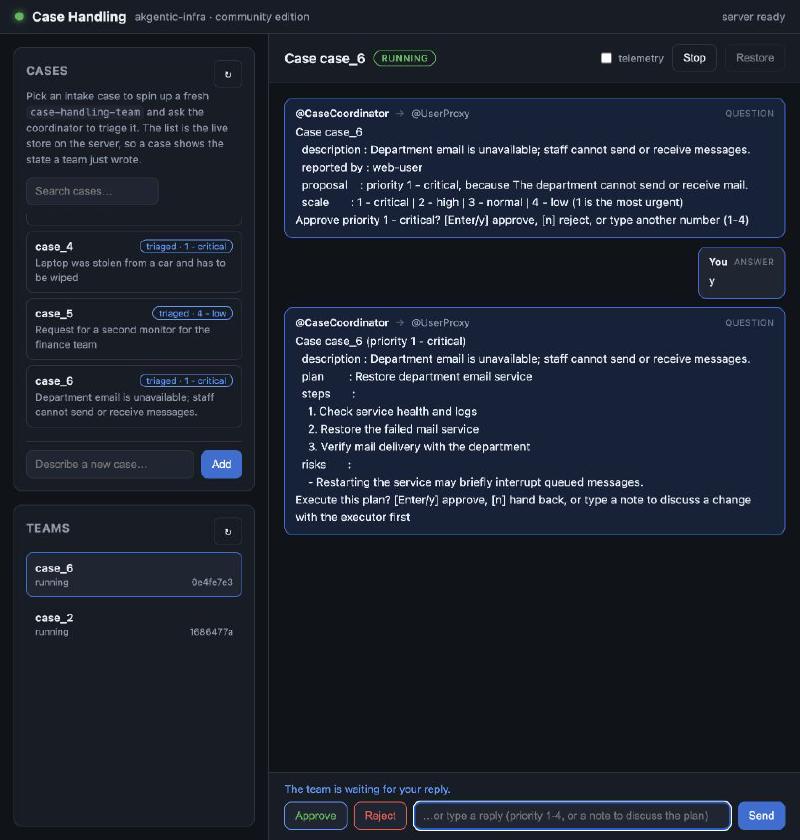
The coordinator now interprets a plan answer three ways:
| Answer | Next action |
|---|---|
y, yes, approve, and the other approval values | Send CaseExecutionDecision(approved=True) |
n, no, reject, or another recognized rejection word | Hand back the plan; remaining text becomes the reason |
| Other text | Send CasePlanFeedback and wait for a revised proposal |
For a reasoned rejection, n too costly is explicit. Text such as make it cheaper requests a
revision. The first, priority question still has its own rules: approve, reject, or override with
a number from 1 to 4.
flowchart TD
    PLAN["Executor proposes a plan"] --> REVIEW["Human reviews"]
    REVIEW -->|"approve"| RECORD["Record approved plan"]
    REVIEW -->|"explicit rejection"| RETURN["Record hand-back and reason"]
    REVIEW -->|"feedback"| DISCUSS["Coordinator: discussing"]
    DISCUSS --> REVISE["Executor: previous plan + feedback"]
    REVISE --> PLAN
    RECORD --> CLOSED["CaseClosed"]
    RETURN --> CLOSED
The model revises the proposal. Deterministic code interprets the verdict and records the outcome.
The executor stores the complete proposal in its observed state: summary, steps, and risks. On a feedback turn it copies those values into the new request before calling the model:
revision = message.model_copy(
    update={
        "case_id": message.case_id or self.team_case_id,
        "previous_summary": self.state.proposed_plan,
        "previous_steps": list(self.state.proposed_steps),
        "previous_risks": list(self.state.proposed_risks),
    }
)

plan = self.act(revision, ExecutionPlan)
self._propose(plan, message.requester_id or self.state.requester_id or "unknown")
“Change step two” is only meaningful if the next turn knows which plan the person saw. Making the proposal explicit in state also gives a restored executor the context needed for a revision, without depending on a live model conversation object surviving a restart.
Every revision costs another model turn. The catalog configures per-run and agent-level usage limits, so the discussion has a budget as well as an approval boundary.
In this sample, approving execution records the approved plan and its outcome on the case. It does not actually restart a mail server or perform the operational steps. The model has a read-only case lookup tool; the write happens in the deterministic decision handler.
Separate history, live delivery, and business data#
There are three kinds of data here, with different owners.
| Data | Storage | What it answers |
|---|---|---|
| Team records, events, agent snapshots | YamlEventStore | What happened, and how can the team be restored? |
| Events for connected observers | LocalEventStream in memory | What can this client replay and follow now? |
| Cases, priorities, actions, approved or returned plans | FileCaseRepository, data/cases.json | What is the business result? |
The catalog is a fourth concern: the reusable configuration from which teams are created. It is not the mutable state of an already-running team.
flowchart TB
    RUN["Running team"]
    RUN -->|"persist events and snapshots"| HISTORY[("Team event store")]
    RUN -->|"append events"| LIVE["Live stream"]
    RUN -->|"explicit domain writes"| CASES[("Case repository")]
    LIVE -->|"WebSocket"| UI["Browser"]
    HISTORY -->|"history, restore, usage totals"| READ["Service reads"]
    CASES -->|"GET /cases"| UI
Restoring the agents, showing a conversation, and retaining the approved business result are related operations, but they do not use one interchangeable store.
The previous in-memory case repository was useful for a console exercise. A service needed case
records to survive a process restart too. FileCaseRepository implements the existing protocol,
loads JSON on construction, and writes through a temporary file followed by replacement. It
returns copies of cases and uses a thread lock around its in-process accesses.
That is a small local backend, not a shared transactional database. Its process-local cache and lock do not coordinate multiple worker processes. Moving the team to distributed infrastructure would also require selecting a suitable shared backend for the application’s cases.
The status shown in the case list is derived from the record: an unset priority means new, a set
priority means triaged, and an execution record means executed or returned. Team status is a
separate lifecycle value. A case can be executed while its team is stopped.
Make the browser an event consumer#
The browser uses HTTP for commands and the WebSocket for incoming events. It renders questions, answers, and the closing result, with a telemetry toggle for the noisier framework messages.
A stream reconnect starts at cursor zero. The client therefore tracks top-level message IDs:
if (msg.id) {
  if (state.seen.has(msg.id)) return;
  state.seen.add(msg.id);
}
This ID is deliberately different from the inner question ID used for human replies. One avoids rendering the same stream message twice; the other correlates an answer with a question.
The current implementation keeps that set for the selected conversation. It is not a durable browser checkpoint. Reloading the page or selecting a conversation again rebuilds local UI state. The sample also keeps answered question IDs in memory, so replaying an old conversation is not a complete pending-task reconstruction mechanism.
There is another practical boundary: LocalEventStream retains messages in memory without a
bounded retention policy. It is a delivery mechanism for this single-process example, not an
unlimited archive. The durable event API is a separate source of history, and stopped-team
WebSocket connections wait for restoration rather than serving the persisted archive themselves.
At this framework revision, large StateChangedMessage payloads are also suppressed from the live
stream. Agent snapshots can be read through /teams/{id}/agent-states; a client should not assume
that every state mutation appears on its socket.
Rebuild the usage view from durable events#
The console version had a usage subscriber with an in-memory ledger. The server already persists
the model usage events, so I added UsageModule to compute the view from those events on demand.
It contributes GET /teams/{team_id}/usage, applies the same team-access dependency used by the
framework, extracts LlmUsageEvent values from persisted event messages, and calls the framework’s
aggregate_usage() function:
events = service.get_events(team_id)
summary = aggregate_usage(_usage_events(events))
return _usage_view(team_id, summary)
The response includes input and output tokens, request counts, an estimated dollar cost, and a per-model breakdown. The browser refreshes the header meter as events arrive. Because the source is durable history, the view can be rebuilt after stop, restore, or a server restart.
The amount is an estimate produced by the framework’s pricing data, not an invoice from the provider. Recomputing it also means it is a derived view rather than a price permanently recorded at the moment of the call. That is enough for this example: a visible discussion loop should make its extra model usage visible too.
Stop, restore, and restart are different operations#
POST /teams/{id}/stop stops execution while preserving the stored team data.
POST /teams/{id}/restore reconstructs a stopped team through akgentic-team. Infrastructure
caches the returned live handle so later messages can reach it.
Community server shutdown follows another path. It shuts down the actor system while preserving
running status for teams that were still active. On startup, LocalRuntimeCache.warm() attempts
to restore those teams. One failed restoration is logged and skipped rather than preventing every
other team from starting.
The right mental model is reconstructing runtime state from persisted data. It does not resume a Python stack at an interrupted instruction, and it does not make external side effects exactly-once.
The sample adds its own policy: when the browser receives CaseClosed, it sends a stop request.
That frees the runtime while retaining the history. Notice who implements it. If no browser is
listening, that particular stop request is never sent. Guaranteed stop-on-completion would belong
in a server-side subscriber or lifecycle policy.
Replaying completion events also requires care. The current client reacts to CaseClosed during
replay as well as live delivery, so restoring a completed conversation can trigger another stop.
For the restoration exercise, use a team paused at an unanswered question. Reading completed
history and restarting finished business work are separate use cases.
The same questions at a larger scale#
After following the local path, the distributed protocols become easier to appreciate.
| Contract | Infrastructure decision |
|---|---|
PlacementStrategy | Choose where a new team runs |
WorkerHandle | Perform lifecycle operations on its worker |
TeamHandle | Send messages and human replies to the runtime |
RuntimeCache | Obtain a usable handle for a team ID |
EventStream / StreamReader | Replay events and deliver them to observers |
AuthStrategy / TeamAccessPolicy | Resolve identity and authorize team access |
HealthMonitor / RecoveryPolicy | Detect failed workers and decide what happens to their teams |
In community, placement and handles call local Python objects. In a distributed deployment, the same service operations need remote implementations. A server accepting the browser’s request may not be the process running the team that answers it.
The infrastructure project describes three tiers:
| Tier | Runtime placement | Supporting components |
|---|---|---|
| Community | Server and actors in one process | YAML, local files, in-memory stream |
| Department | Separate server and workers | Docker Compose, HTTP, Redis, MongoDB |
| Enterprise | Distributed server and workers | Kubernetes, Dapr, shared storage and observability |
Department and enterprise are implemented in sibling packages. akgentic-infra provides the shared
contracts and community implementation, plus shared server and worker building blocks. This
article runs the community version; the larger tiers explain why the interfaces exist.
Moving execution to a worker creates several concrete questions. Which worker has capacity? How does the server locate an existing team? How do events travel back to a client connected elsewhere? How do we detect a missing worker, and should its teams be marked stopped or restored elsewhere? Health detection and recovery are separate policies because detecting failure does not determine the right business response.
Dapr enters at that infrastructure boundary. The enterprise design uses it for concerns such as service invocation, state, and event distribution. It does not turn the individual Python agents in this example into Dapr actors. Their application-level actor model remains the one introduced at the start of the series.
Identity is another deployment concern with application consequences. The default community user
is anonymous, so this demo does not separate different people. The framework supplies an
identity contract and a default owner-or-admin team policy; real authentication needs both a
resolver and the middleware composition that enforces it. Our own case routes and business store
would need the corresponding authorization design as well.
Run the final example#
Start from a fresh checkout of the final sample, or keep an existing experiment’s data separately. A catalog that was seeded by an earlier chapter can still name the old terminal proxy: the seed-once guard does not migrate existing configuration.
The current package declares Python >=3.12,<=3.13; Python 3.12 is a straightforward choice for
this walkthrough. With uv and Git installed:
git clone https://github.com/jettro/basic-akgents.git
cd basic-akgents
uv sync
Create a local .env file containing your OPENAI_API_KEY. Do not commit it. The server loads it
before creating teams. Then start the application:
make serve
# equivalent: uv run src/main.py
Open http://localhost:8000/ui/. There is no frontend build command. The same process serves the page and its HTTP/WebSocket API.
A useful first run is:
- Select
case_2, the department-wide mail outage. - Read the proposed priority and its reasoning. Click Approve, or send a number from 1 to 4 to approve a different priority.
- Read the proposed execution plan. Send
make it less disruptiveto request a revision. - Read the revised plan and approve it. The sample records the result, updates the case list, and stops the team when the browser observes completion.
- Turn on telemetry to inspect framework messages, and inspect the usage meter when running with a real model.
For a separate lifecycle experiment, start an unfinished case and stop the team while it is waiting for an answer. Restore it and answer the pending question. Restarting the server while a team is running exercises startup restoration instead. A second browser can select the same team from the Teams list to observe its stream, but this sample does not arbitrate competing human answers across clients.
You can inspect the boundaries without the UI:
curl http://localhost:8000/readiness
curl http://localhost:8000/cases
curl http://localhost:8000/admin/catalog/team/case-handling-team/resolve
The last endpoint is under /admin/catalog, not /catalog. The readiness endpoint reports
whether the server is ready or draining; it is not a check of every model provider or worker.
To reset a disposable demo, make clean-data removes all of data/, including cases,
catalog configuration, and team history. Keep anything you want to retain before using it. It is
not part of ordinary stop/restore.
What I take from the complete series#
I started with actors and typed messages. Then I added team lifecycle and persistence, model reasoning, reusable tools, LLM-powered agents, and a catalog. Each layer gave the application a new capability while keeping an existing responsibility in a recognizable place.
Infrastructure completes that progression by moving runtime ownership into a service. The human bridge becomes asynchronous. The browser becomes an event consumer. A team can be operated through an ID rather than a local Python reference. Configuration, execution history, business records, and live delivery each have a clear role.
The final example also shows why the earlier boundaries were useful. I could replace the terminal, retain the two reply vocabularies, add a conversation around a plan, persist the business result, and rebuild usage totals without asking an LLM to manage lifecycle or approval rules. The model still handles judgement and proposals. Code still decides what a verdict means and when a write is allowed.
That is the architectural lesson I take from Akgents: give each kind of work an explicit contract, and keep those contracts when the application grows. The infrastructure becomes more involved as execution spreads across processes, but the case workflow remains understandable.
This closes Akgents, a battle-tested agent framework. If you arrived at this final chapter first, start with the core and follow how the same small case-handling example acquired each of these boundaries.